5. Sending Tokens
Send AMA or another token you hold from the Amadeus Wallet extension, pick a recipient from your contacts, and understand the network fee.
Overview
You can send AMA, or any other token your account holds (such as PRIME), to another Amadeus address. Each transfer is signed in the extension, submitted to the network you are using, and confirmed before the wallet shows it as sent.
Prerequisites
- The wallet is unlocked
- The recipient's Amadeus address (a Base58 public key)
- Enough AMA for the 0.02 AMA fee reserve the wallet keeps back (on top of the amount for AMA transfers), even when you send another token
Step-by-Step Guide
Step 1: Open the Send screen
On the dashboard, click "Send".
Step 2: Fill in the form
The Send screen shows your Available Balance for the selected token at the top.
-
Token: choose the token to send. AMA is always listed. Other tokens appear when your account holds them. Changing the token clears the amount.
-
Recipient Address: enter the recipient's address. You can also:
- click the address book icon ("Pick a contact") to choose a saved contact, or
- click the paste button to paste from the clipboard.
If the address belongs to a saved contact, "Saved contact:" and the contact's name appear below the field. If the address is on the Amadeus malicious-address list (the wallet always reads this list from Mainnet), a red "Flagged address" warning appears.
-
Amount: enter the amount, up to 9 decimal places. Click "MAX" to send the most you can:
- for AMA, your balance minus the 0.02 AMA fee reserve
- for other tokens, your full balance of that token
Below the field you will see Network Fee: ~0.02 AMA. This is the reserve the wallet holds back, not the exact fee (see Network Fee). For AMA, once you enter an amount, a Total that includes it also appears.
-
Click "Review Transaction". The button stays disabled until the form is valid.
Common form messages:
- "Invalid Amadeus address (must be base58 and 48 bytes decoded)"
- "Insufficient balance"
- "Amount exceeds available balance after fees"
- "Not enough AMA to cover the ~0.02 AMA network fee" (when sending a token other than AMA)
Step 3: Review and confirm
The Confirm Transaction screen shows:
- You're sending: the amount and token
- From: your account name and address
- To: the recipient's address
- Amount and Network Fee (the 0.02 AMA reserve)
- Total (AMA transfers only), the amount plus the reserve
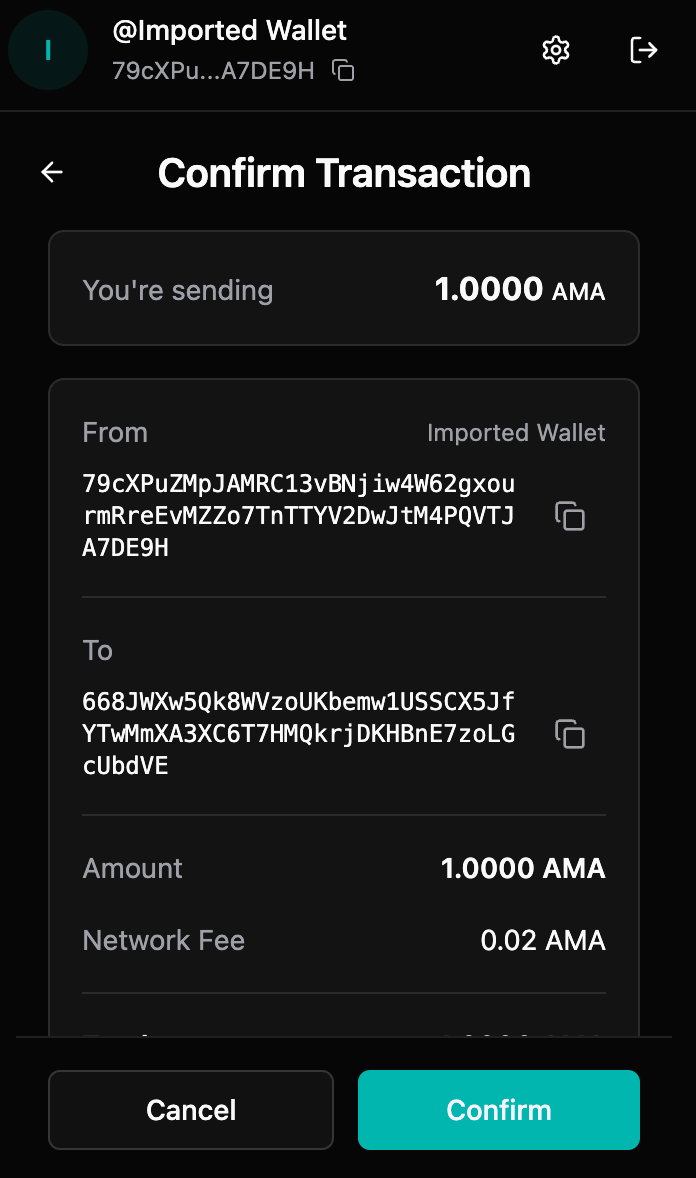
Check every detail, especially the recipient address. Transactions cannot be reversed.
- Click "Confirm" to send, or "Cancel" to go back and edit.
- If the recipient is on the malicious-address list, the screen shows "Recipient is flagged as malicious" and the button changes to "Send anyway". Cancel unless you are certain you trust the recipient.
Step 4: Wait for confirmation
The wallet shows "Sending Transaction" while it submits the transfer and waits for the network to confirm it.
If the network rejects the transfer, or the transfer fails when it executes, you return to the confirm screen with a "Transaction Failed" message that explains why.
Step 5: Transaction sent
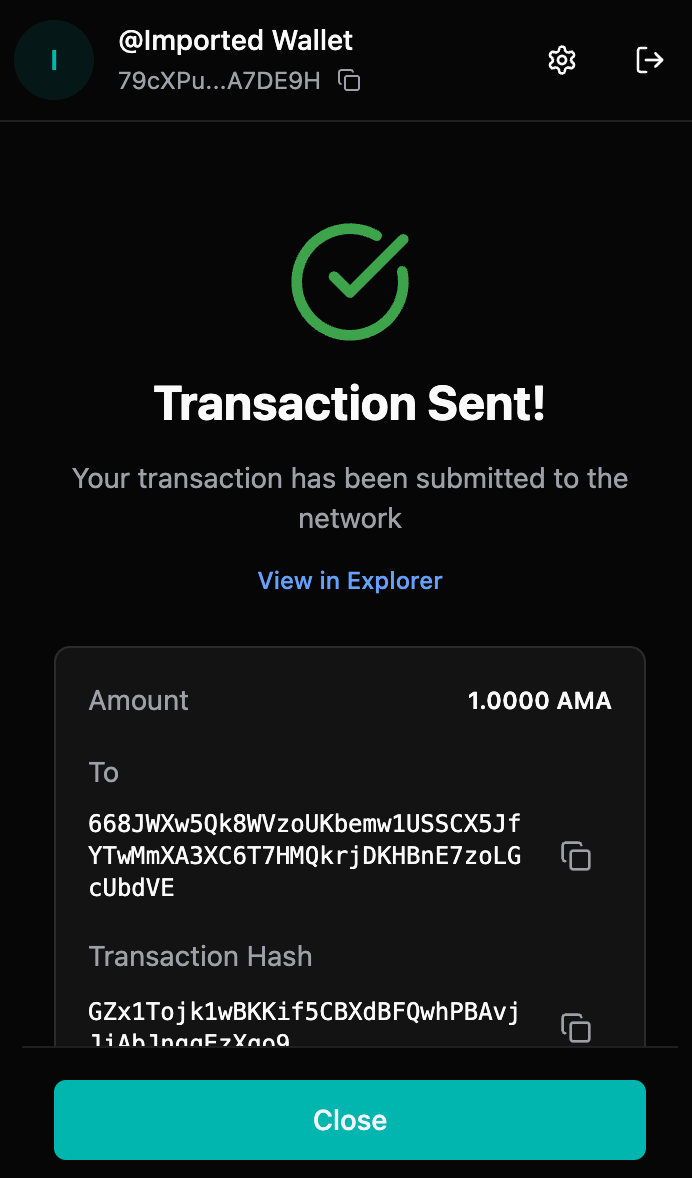
When the transfer is confirmed, you will see "Transaction Sent!" with:
- View in Explorer: opens the transaction in the explorer for your network (explorer.ama.one on Mainnet)
- Amount and To
- Transaction Hash, with a copy button
If the recipient is not in your contacts yet, a "Save this recipient?" box lets you enter a Contact name and click "Save". See Contacts.
Click "Close" to return to the dashboard.
Network Fee
- The ~0.02 AMA the wallet shows is a reserve, not what the network charges. The wallet adds it to the total for AMA transfers and leaves room for it when you click MAX.
- The network locks a budget of 0.01 AMA for each transaction, charges for the transaction's size and the work and storage it uses, and refunds the rest. A transfer to an account that already holds AMA costs about 0.0003 AMA, and one to a new account about 0.0015 AMA. Your balance drops by the amount plus that cost, not by the amount plus 0.02 AMA.
- The cost does not change with network load. Half goes to the validator that includes the transaction and half is burned.
- The fee is always paid in AMA, even when you send PRIME or another token. Keep some AMA in the account for fees.
- See Transaction fees for how the cost is calculated.
Transaction Hash
Every transaction has a unique hash. Use it to:
- Find the transaction in the explorer
- Share proof of payment with the recipient
- Find the transfer later in your transaction history
Security Tips
- ✅ Always check the recipient address, character by character for new recipients
- ✅ Save addresses you use often as contacts to avoid copy-paste mistakes
- ✅ Send a small test amount to a new address first
- ✅ Check which network you are on. A Testnet badge appears under the header on Testnet.
- ❌ Never ignore a "Flagged address" warning unless you are certain
- ❌ Be wary of anyone pressuring you to send tokens quickly
Troubleshooting
"Insufficient balance" or "Amount exceeds available balance after fees"
- Lower the amount, or click MAX
- Remember that the wallet keeps 0.02 AMA back on top of the amount
- Before 1.9.2, the amount MAX filled in could fail this check through a rounding error for some AMA balances, such as 0.3 AMA. 1.9.2 compares amounts in base units, so the MAX amount is accepted. Update the extension, or lower the amount by 0.000000001 AMA.
"Not enough AMA to cover the ~0.02 AMA network fee"
- You are sending a token other than AMA, but the account has less than the 0.02 AMA the wallet keeps back. Add some AMA to the account first.
"Transaction Failed"
- Read the message on the confirm screen for the reason
- Check your balance and the recipient address
- Check your internet connection and the network in Settings → Active Networks, then try again
Wrong address
Transactions cannot be reversed.
- Before you confirm, click "Cancel" and correct the address
- After a transfer is sent, tokens sent to the wrong address cannot be recovered by the wallet